
In this guide
- Free Tier — Get Your Inventory Listed
- Create Your XML Product Feed
- XML Feed Fields Reference
- XML Feed Example
- Paid Tier — Widget Integration
- Access Your sommelier.bot CMS
- Pop-up Widget (Chat Icon)
- Full-page Embed
- On-click Trigger (Dialog)
- Cloud-hosted sommelier.bot
- AI Banner Integration
- Create & Customize a Banner
- Get Your Banner Embed Code
- Banner Placement Guide
- Quick Reference — All Scripts
- Need Help?
Get Your Inventory Listed
Submit Your Product Inventory
To get your wine & spirits catalog indexed by sommelier.bot, provide us with your product inventory in one of the following formats:
| Format | Details | Sync |
|---|---|---|
| XML Product Feed | A hosted URL containing your active products in XML format (Google Merchant / Shopify / WooCommerce compatible). See full specification below. | Automatic — re-synced nightly at 3 AM |
| CSV / Excel | A spreadsheet with columns: Product Name, Producer, Price, URL, Image URL, Description, Color, Region, Varietal, Format (L). | Static — one-time import, no automatic updates |
Send your feed URL or file to support@sommelier.bot and we'll index your catalog within 48 hours.
Create Your XML Product Feed
Your XML Product Feed is a URL hosted on your website, containing all your active products in a structured XML format. The sommelier.bot system calls this URL every night at 3 AM to sync your latest inventory.
Added to your sommelier.bot inventory. Can be tagged and activated from the CMS.
Considered out of stock. Deactivated automatically, but stays in your CMS.
Name, price, description, link, and image URL are updated automatically.
XML Feed Fields Reference
Your XML feed must follow this structure, using the <rss> / <channel> / <item> hierarchy. Each "item" is one product.
45425007NM-75LCT06
2017 Domaine de la Romanee-Conti La Tache Grand Cru
Vallis Mareni
XXXX.XX — no comma, no space, no currency sign. Example: 12.00
XML Feed Example
Here is a complete example with two products:
Widget Integration
Your custom sommelier.bot is ready. Below is everything you need to install the AI sommelier on your website: pop-up chat, full-page embeds, and on-click triggers. Each requires a single line of JavaScript.
A. Access Your sommelier.bot CMS
Your management dashboard is where you configure languages, customize the widget, and grab your embed codes.
- Go to https://business.sommelier.bot/
- Log in with the credentials provided in your welcome email.
- Change your temporary password immediately after first login.
From the CMS, navigate to Playground to configure your widget language and type, and click "Embed code" to copy your script.
B. Select your sommelier.bot integration
sommelier.bot widget JS is a lightweight script that adds a chat interface to your website. It supports 4 modes:
- Popup: bottom right classic popup floating button + fullscreen dialog window
- Dialog: no popup, to be used for a button or a link on-page that opens the fullscreen dialog window programmatically
- Embed: inline iframe (less recommended)
- Banner: nano sommelier.bot agent fully contextualized with page and user data, seamlessly embedded inline on product, category or homepage in a div container. It triggers the full dialog version when the user interacts with the banner.
Check below for each integration code and style.
Pop-up Widget (Chat Icon)
The pop-up adds a floating chat icon to the bottom-right of your website. Visitors click it to open the full AI sommelier — with product recommendations, food pairings, maps, and more.
| Attribute | Description |
|---|---|
| merchant | Your unique merchant identifier (provided in your welcome email). |
| lang | Default language: en, de, fr, it, es, cn, pt, ru, etc. |
Where to place it:
- Site-wide — paste in your website footer/global template to show on all pages.
- Single page — paste only on the page where you want the chat icon to appear.

Full-page Embed
Embed the complete sommelier.bot experience directly into a page on your website — as a dedicated "AI Sommelier" or "Chatbot" page. Uses the same script as the pop-up, placed inside a container div.
This renders the full chat interface inline — identical to the pop-up experience but integrated directly within your page layout. Ideal for a dedicated "Chat with our AI Sommelier" page in your navigation.
On-click Trigger (Dialog)
Don't want any pop-up icon on all pages or banners? Open the sommelier.bot programmatically from any button, link, or element on your site using a single JavaScript call. This headless mode opens the dialog programmatically with no UI chrome.
Step 1: Place the script below (with mode="dialog") to pre-load the widget — only if you don't already have a popup or banner integration on this page.
Step 2: Place the onclick trigger wherever you'd like a button or link to open the sommelier.bot.
Use this to add "Ask our Sommelier" CTAs anywhere on your site — product cards, navigation menus, promotional banners, email links, etc.
Cloud-hosted sommelier.bot
Every paid account includes a fully hosted, standalone sommelier.bot at its own URL — no installation required. Share it anywhere: social media, QR codes, email signatures, printed materials.
This URL is fully responsive (mobile + desktop) and managed from your same CMS dashboard. Encode it in a QR code for physical touchpoints: in-store displays, wine lists, event materials, business cards.
AI Banner Integration
The AI Banner is a compact, context-aware agent that reads the page it's placed on — product data, category context, user history, location, past conversations — and generates a personalized one-liner to engage the visitor with quick action buttons. When a visitor interacts with the banner, it opens the full sommelier.bot dialog. You can create unlimited banners per shop, each with its own custom instructions and visual style.
Create & Customize a Banner
Go to https://business.sommelier.bot/banners in your CMS and click "Create new banner". You can create as many banners as you need — one per page type, one per campaign, or one per product category.
Tab 1 — Custom Instructions (optional):
Add specific instructions for this banner's behavior. By default, every banner is already context-aware: it automatically reads the page content, user data, past conversations, location, and more. You only need custom instructions if you want to override the default behavior — for example, a specific tone of voice, custom call-to-action buttons, or additional data the page doesn't contain in its content.

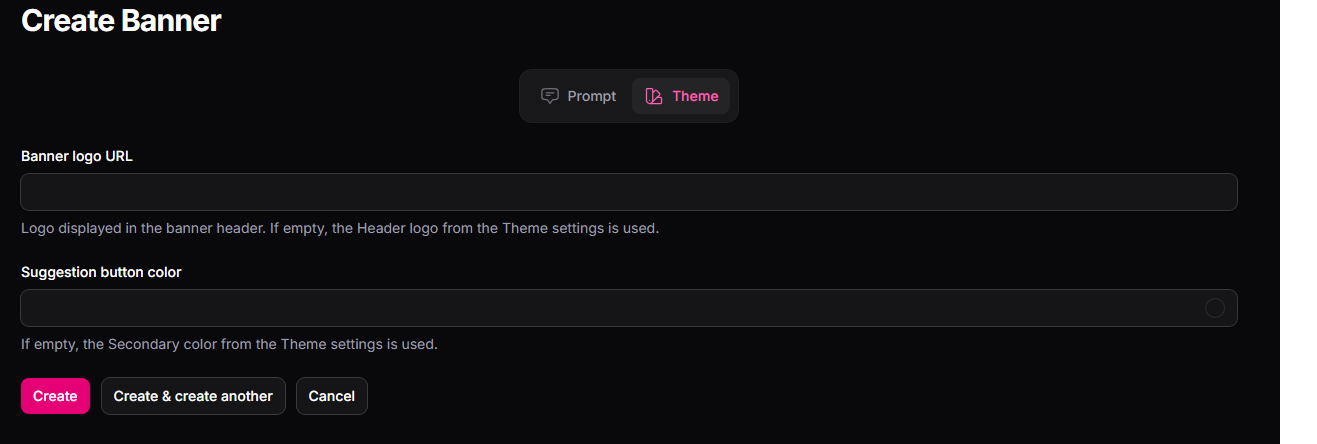
Tab 2 — Customize Theme (optional):
Customize the logo and color scheme for this specific banner to match the page or campaign it belongs to. Each banner can have its own visual identity.
Get Your Banner Embed Code
Once your banner is created, click the "Embed Code" button on the top-right of the banner screen to get your unique embed code. Each banner has its own banner-id, so you can embed different banners on different pages.
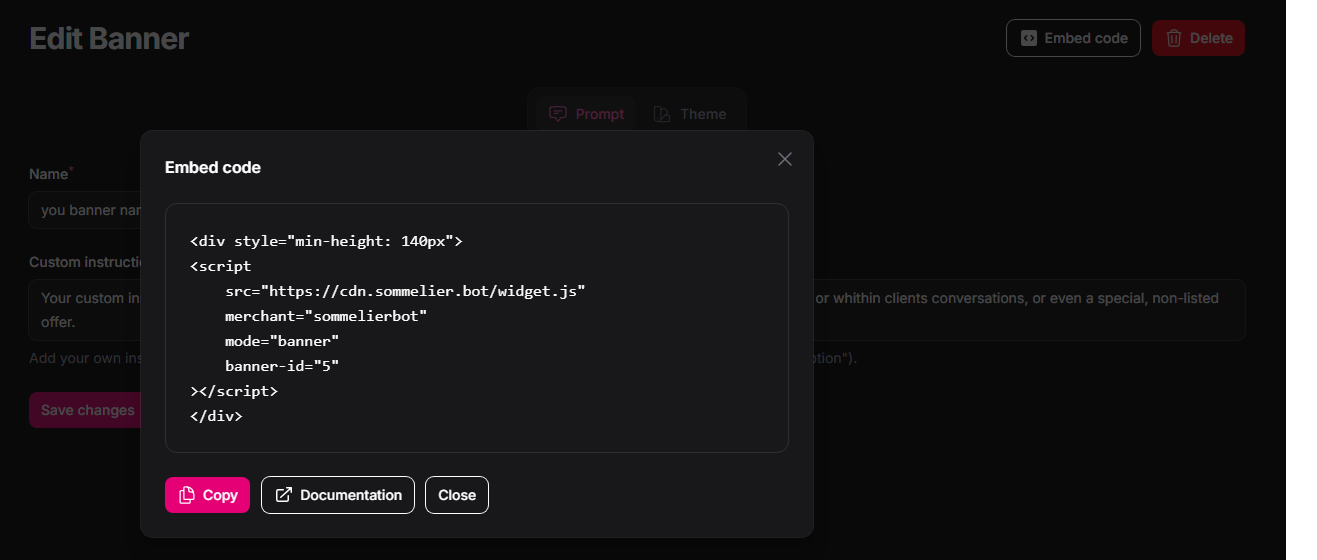
Every banner embed code follows this structure — a JavaScript snippet inside a div container:
| Attribute | Description |
|---|---|
| mode="banner" | Activates banner mode instead of the default pop-up. |
| banner-id | The unique ID of this banner (assigned when you create it in the CMS). Each banner has its own ID. |
| min-height: 140px | Reserves space for the banner while it loads, preventing layout shift. |
Banner Placement Guide
Paste the banner embed code wherever you'd like it to appear on your page, template, or layout. Here are the recommended placements:
| Page Type | Recommended Position | What the AI Does |
|---|---|---|
| Product page | Below the "Add to Cart" button | Generates a contextual prompt about the specific product — food pairings, similar wines, tasting notes. |
| Category page | Top of the product grid | Engages visitors to explore by palate, region, or pairing preference. |
| Homepage | Hero section or mid-page | General engagement prompt driving wine discovery. |
| Ad landing page | Above the fold | Uses campaign keywords as context to trigger a fully personalized AI conversation. |


Quick Reference — All Scripts
Need Help?
We're here for you
If you run into any issues during setup or want to discuss advanced integrations, reach out:
| Documentation | sommelier.bot/documentation |
| Contact | Contact us |
| CMS Dashboard | business.sommelier.bot |


